Code execution with MCP: why agents should write code
Code execution with MCP lets an agent call tools from code, so definitions and big results stay out of context. How it works, with a runnable token count.
Code execution with MCP means the agent calls its tools from code it writes, instead of calling each tool directly through the model. Tool definitions load only when the code needs them, and big tool results stay in a sandbox, so the model reads a few hundred tokens where it used to read hundreds of thousands. Anthropic’s engineering team wrote the pattern up on November 4, 2025, and I think it’s the most useful idea about agent cost published this year.
What did Anthropic publish?
The post, by Adam Jones and Conor Kelly, names two costs that grow as you connect more Model Context Protocol servers to an agent. First, most MCP clients put every tool definition into the context up front. Second, every intermediate result passes through the model, sometimes twice: once when a tool returns it and again when the model copies it into the next call.
Their fix is to present each MCP server as a folder of code files, one file per tool. The agent lists the folders, opens the two or three files it needs, and writes a short program that calls those tools and processes the results. In their example that cut a task “from 150,000 tokens to 2,000 tokens”. Those are Anthropic’s numbers for their setup; I haven’t seen the workload behind them.
Cloudflare reached the same idea a few weeks earlier and called it Code Mode (September 26, 2025). Two teams publishing the same design within six weeks of each other is a decent sign it holds up.
Why does loading every tool cost so much?
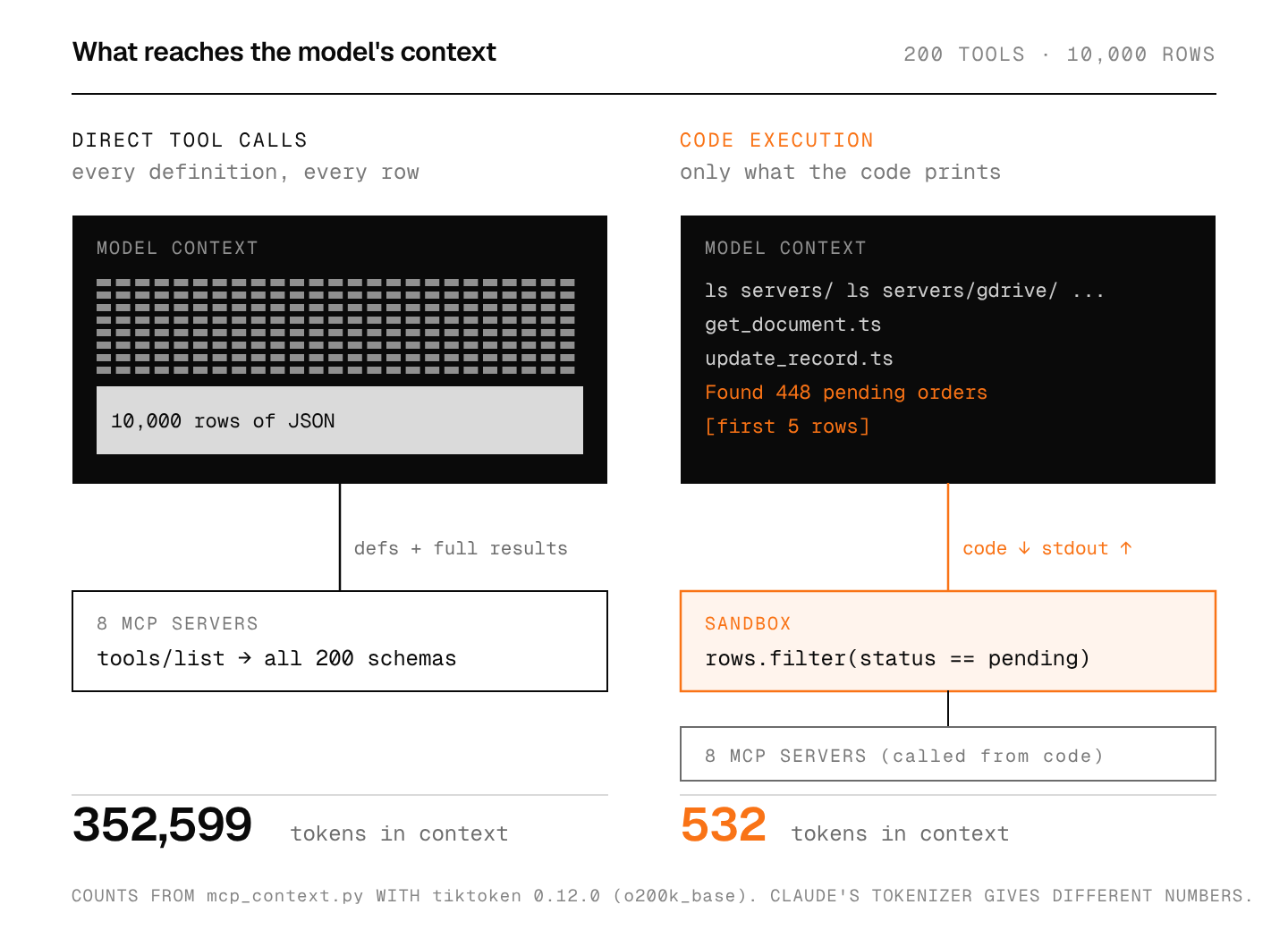
A tool definition is text: a name, a description and a JSON Schema for the inputs. The model can only choose a tool it has read, so a classic MCP client sends all of them on every request. Connect eight servers with 25 tools each and the model rereads 200 schemas before it reads your question.
Results are the bigger leak. Ask an agent to find pending orders in a 10,000-row sheet and the direct approach returns all 10,000 rows into the context. The model then filters them by reading, which is slow and error-prone, and past a certain size the rows don’t fit at all.
How much context does code execution save?
The quickest way to feel the difference is to count it. This script builds 200 fake tool definitions in the shape MCP’s tools/list returns, writes each one out as a TypeScript file the way Anthropic’s post describes, and counts tokens for both approaches. Run it in an empty folder; it writes a servers/ directory.
# mcp_context.py: count what the model reads with direct MCP tool calls
# versus code execution. Python 3.13, tiktoken==0.12.0.
# o200k_base is a stand-in tokenizer; Claude's tokenizer gives different counts.
import json, os, random, shutil
import tiktoken

enc = tiktoken.get_encoding("o200k_base")
def tok(text): return len(enc.encode(text))

# 1. Eight fake MCP servers, 25 tools each, in the shape tools/list returns.
SERVERS = ["gdrive", "salesforce", "slack", "github", "jira", "postgres", "stripe", "calendar"]
VERBS = ["get", "list", "create", "update", "delete"]
NOUNS = ["record", "document", "message", "issue", "event"]

def tool(server, verb, noun):
    return {
        "name": f"{server}_{verb}_{noun}",
        "description": f"{verb.capitalize()} a {noun} in {server}. Returns the {noun} "
                       "object with id, timestamps, owner and metadata.",
        "inputSchema": {"type": "object", "required": ["id"], "properties": {
            "id": {"type": "string", "description": f"The {noun} id"},
            "fields": {"type": "array", "items": {"type": "string"},
                       "description": "Fields to return"},
            "data": {"type": "object", "description": f"New values for the {noun}"}}},
    }

tools = [tool(s, v, n) for s in SERVERS for v in VERBS for n in NOUNS]
direct_defs = tok(json.dumps(tools))

# Code execution: each tool becomes a small TypeScript file on disk.
shutil.rmtree("servers", ignore_errors=True)
for t in tools:
    server, fn = t["name"].split("_", 1)
    os.makedirs(f"servers/{server}", exist_ok=True)
    with open(f"servers/{server}/{fn}.ts", "w") as f:
        f.write(f'import {{ callMCPTool }} from "../../client.js";\n'
                f'/* {t["description"]} */\n'
                f'export async function {fn}(input: {{ id: string; fields?: string[]; data?: object }}) {{\n'
                f'  return callMCPTool("{t["name"]}", input);\n}}\n')

# The agent lists two folders and opens the two files the task needs.
reads = "\n".join(sorted(os.listdir("servers"))
                  + sorted(os.listdir("servers/gdrive"))
                  + sorted(os.listdir("servers/salesforce"))
                  + [open("servers/gdrive/get_document.ts").read(),
                     open("servers/salesforce/update_record.ts").read()])
code_defs = tok(reads)

# 2. A 10,000-row sheet comes back from one tool call.
random.seed(7)
rows = [{"order_id": f"ORD-{i:05d}", "customer": f"cust_{random.randint(1, 900)}",
         "status": random.choice(["paid"] * 19 + ["pending"]),
         "amount_inr": random.randint(199, 49999)} for i in range(10_000)]
direct_rows = tok(json.dumps(rows))           # every row enters the context

pending = [r for r in rows if r["status"] == "pending"]   # runs in the sandbox
printed = f"Found {len(pending)} pending orders\n" + json.dumps(pending[:5])
code_rows = tok(printed)                      # only the printout enters the context

print(f"tools: {len(tools)} across {len(SERVERS)} servers")
print(f"{'':22}{'direct':>9}{'code':>8}")
print(f"{'tool definitions':22}{direct_defs:>9,}{code_defs:>8,}")
print(f"{'10,000-row result':22}{direct_rows:>9,}{code_rows:>8,}")
print(f"{'total':22}{direct_defs + direct_rows:>9,}{code_defs + code_rows:>8,}")
print(printed.splitlines()[0])
Output:
tools: 200 across 8 servers
                         direct    code
tool definitions         22,727     361
10,000-row result       329,872     171
total                   352,599     532
Found 448 pending orders
Two things stand out. The definitions alone cost about 23,000 tokens on every request, before any work happens. And one big tool result is worth more than ten times all the definitions put together: 329,872 tokens is bigger than a 200,000-token context window, so on a model with that limit the direct approach fails outright instead of just costing more.
These are toy servers with short descriptions and the counts come from OpenAI’s o200k_base tokenizer, which I use as a stand-in because it runs offline. Real MCP servers tend to have longer descriptions, and Claude counts tokens differently, so read the table for its ratios rather than as a prediction of your bill.
How does code execution with MCP work?
There are three moving parts, and only one of them is new.
- A code view of each server. Something generates a file per tool, like
servers/gdrive/get_document.ts, whose function body just forwards to the real MCP call. The model discovers tools by listing folders and opening files, which is something models already do well in coding agents. - A sandbox that runs the agent’s code. The code imports the two tools it needs, calls them, filters or joins the results, and prints a small summary. Loops and retries live in the code, so polling a Slack channel for “deployment complete” is one
whileloop instead of twenty model turns. - The model loop. It’s unchanged. The model reads what the program printed and decides what to do next.
Anthropic also suggests an alternative to the folder listing: a search_tools tool with a detail-level parameter, so the agent can ask for names only, names plus descriptions, or full schemas. Either way, the principle is progressive disclosure: the model sees short names first and loads a full schema only when it decides to use that tool.
Is it safer than direct tool calls?
It can keep data away from the model, and it adds a new risk. On the plus side, intermediate results stay in the sandbox unless the code prints them, and the post describes a client that swaps emails and phone numbers for placeholders like [EMAIL_1] before anything reaches the model, then swaps them back when the data goes to the next tool. Customer records can move from a sheet to a CRM without the model ever reading them.
The new risk is that you’re now running code a model wrote. Anthropic says so plainly: it “requires a secure execution environment with appropriate sandboxing, resource limits, and monitoring.” The tool calls inside that code are as dangerous as the tools themselves, and the model writing the code can still be steered by text it read earlier. I wrote about that failure mode two weeks ago in what an AI browser reads. A sandbox with no network access except the MCP client, plus the same allow-or-ask gate, is the minimum I’d want.
When should you skip it?
When the agent has a handful of tools and small results. Five tools with short schemas cost a few hundred tokens, and a sandbox costs real operational work: a runtime, timeouts, memory limits, logs, and someone to read them when a generated script hangs. Direct calls are simpler to debug because every step shows up in the transcript.
My rule of thumb: switch once tool definitions take more than a few thousand tokens per request, or once any tool can return results bigger than the answer you want. Below that, a well-scoped tool list does the job. Picking fewer tools also helps the parallel agent setups I covered last week, since every attempt in a best-of-N run pays the same definition overhead.
FAQ
Does code execution with MCP replace MCP?
No. The MCP servers stay exactly the same. Only the client changes: it exposes the servers as code instead of as a flat tool list, and the generated functions still make ordinary MCP calls.
What is Cloudflare Code Mode?
Cloudflare’s name for the same approach, published September 26, 2025. It converts MCP tools into a TypeScript API and has the model write code against it, running in a sandbox.
Do I need TypeScript for this?
No. Anthropic’s example uses TypeScript files, but the idea works in any language your sandbox runs. What matters is that tool definitions live somewhere the agent can read on demand and that results stay outside the context until the code prints them.
Sources
- Anthropic, Code execution with MCP: Building more efficient agents, November 4, 2025
- Cloudflare, Code Mode: the better way to use MCP, September 26, 2025
- Model Context Protocol specification: tools
- OpenAI, tiktoken (0.12.0)