Git worktrees for parallel AI coding agents
Cursor 2.0 runs up to eight agents on one prompt using git worktrees. How worktrees work, a runnable best-of-3 script, and the gotchas that bite first.
A git worktree is a second (or eighth) working directory attached to the same repository, each on its own branch. That one feature is what lets several coding agents edit the same project at once without overwriting each other’s files, and it’s the piece Cursor 2.0 built its new multi-agent interface on.
What changed in Cursor 2.0?
Cursor released 2.0 on October 29, 2025, with two headline items: Composer, its first in-house coding model, and an editor laid out around agents instead of files. The changelog puts the parallel part in three sentences: “Run up to eight agents in parallel on a single prompt. This uses git worktrees or remote machines to prevent file conflicts. Each agent operates in its own isolated copy of your codebase.”
The launch post adds the reason to bother: “having multiple models attempt the same problem and picking the best result significantly improves the final output, especially for harder tasks.” Cursor didn’t publish numbers for that claim in the post, so treat it as their observation.
Everything below is plain git. It works the same whether the agents come from Cursor, a CLI agent in three terminal tabs, or a script.
Why do parallel agents need separate working directories?
Two agents in one folder share one set of files on disk. Agent A rewrites price.py, agent B reads the half-edited file a second later and builds on it, and your test run now measures a blend of both. Branches alone don’t fix this, because a normal checkout has one working directory and switching branches changes the files under every process using it.
You could git clone the repo eight times. That works, and costs eight copies of the history plus eight remotes to keep in sync. A worktree shares the one .git object store and only adds a checkout of the files.
How do you run best-of-N with git worktrees?
The smallest version: a repo with a bug and a test, three worktrees, three different attempts at the fix, the same test run in each, and the winner merged back. Each “agent” here is a one-line sed standing in for a model run, so the script is deterministic and runs anywhere with git and Python.
#!/usr/bin/env bash
# parallel.sh: three "agents" attempt the same fix in three git worktrees.
# git 2.47, bash. Each agent here is a one-line edit standing in for a model run.
set -euo pipefail
rm -rf /tmp/wt-demo && mkdir -p /tmp/wt-demo && cd /tmp/wt-demo
git init -q -b main app && cd app
git config user.email demo@example.com && git config user.name demo

cat > price.py <<'PY'
def with_gst(amount):
    return amount * 1.8   # bug: GST is 18%, so this should be 1.18
PY
cat > test_price.py <<'PY'
from price import with_gst
assert round(with_gst(100), 2) == 118.0, with_gst(100)
print("ok")
PY
git add . && git commit -qm "price with bug"

# One branch and one working directory per attempt, all sharing one .git
for n in 1 2 3; do
  git worktree add -q -b "agent-$n" "../agent-$n"
done
git worktree list

# Three different "answers" to the same prompt
sed -i 's/\* 1.8 .*/* 1.18/'          ../agent-1/price.py
sed -i 's/\* 1.8 .*/+ amount * 0.18/' ../agent-2/price.py
sed -i 's/\* 1.8 .*/* 18/'            ../agent-3/price.py

# Score each attempt with the same test, in isolation
for n in 1 2 3; do
  if (cd "../agent-$n" && python3 test_price.py >/dev/null 2>&1); then
    echo "agent-$n: pass"
  else
    echo "agent-$n: fail"
  fi
done

# Keep the smallest passing diff, throw the rest away
(cd ../agent-1 && git commit -qam "fix GST multiplier")
git merge -q --ff-only agent-1
python3 test_price.py
for n in 1 2 3; do git worktree remove --force "../agent-$n"; git branch -qD "agent-$n"; done
git worktree list
git log --oneline
Output (commit hashes change on every run):
/tmp/wt-demo/app      3a75890 [main]
/tmp/wt-demo/agent-1  3a75890 [agent-1]
/tmp/wt-demo/agent-2  3a75890 [agent-2]
/tmp/wt-demo/agent-3  3a75890 [agent-3]
agent-1: pass
agent-2: pass
agent-3: fail
ok
/tmp/wt-demo/app  af8c503 [main]
af8c503 fix GST multiplier
3a75890 price with bug
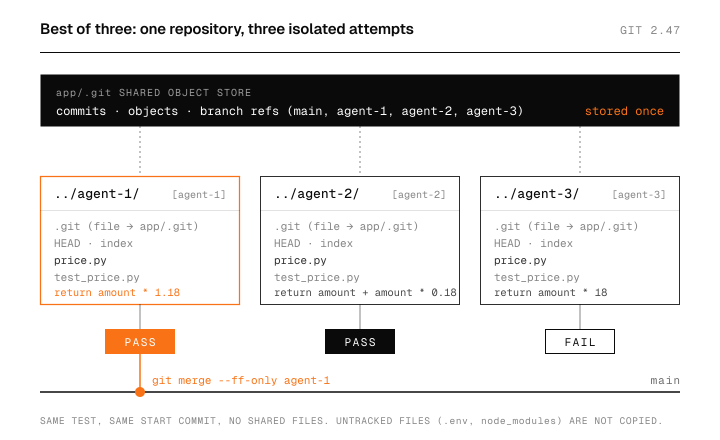
Four directories, one repository. All three worktrees start at the same commit, 3a75890, so every attempt answers the same question from the same starting point. Two attempts pass and one fails, and nothing about agent 3’s broken file leaks into agent 1’s test run. After cleanup there’s one worktree again and one new commit on main.
The selection step is the part worth thinking about. Here a test decides, and the script hard-codes the pick of the smaller passing diff. With real agents you need the same thing: something that scores attempts without you reading eight diffs line by line.
How do git worktrees work?
A linked worktree is a directory with your files and a small .git file (a file, not a folder) that points back to the main repository. The git docs describe it as letting one repository “check out more than one branch at a time.” Commits, objects and refs live in one place. Each worktree gets its own HEAD, index and files.
That split explains both the speed and the rules. Creating a worktree only writes the checked-out files, so it’s cheap for most repos. And because all worktrees share one set of branch refs, git enforces one rule hard: a branch can be checked out in only one worktree at a time.
Where do worktrees break?
The branch rule shows up first. Ask for a second checkout of main and git refuses:
git worktree add ../same mainPreparing worktree (checking out 'main')
fatal: 'main' is already used by worktree at '/tmp/wt-demo/app'That’s why the script creates a new branch per agent with -b.
The second one is quieter. A new worktree contains only tracked files. Put an untracked .env in the main checkout of the demo repo, add a fourth worktree, and list it:
echo "API_KEY=dummy" > .env
git worktree add -q -b agent-4 ../agent-4 && ls -a ../agent-4
.
..
.git
price.py
test_price.pyNo .env. The same goes for node_modules, virtualenvs, build caches and local databases. An agent that runs tests in a fresh worktree hits missing secrets and missing dependencies before it hits your bug, so each worktree needs a setup step (copy env files, install packages) before the agent starts.
Then there’s everything outside the repo. Two agents in two worktrees still share your machine: the same port 3000, the same local Postgres, the same simulator. File isolation does nothing for those. Cursor’s mention of remote machines as the other option makes sense for exactly this reason.
What does best-of-N cost?
Every attempt is a full agent run, so the model bill for one prompt scales with N. If one run of a task costs C in tokens, eight parallel attempts cost about 8C, plus your time reviewing.
My rule of thumb: use one attempt for tasks where a test or a quick look settles it, and spread out only when the task is hard enough that you’d otherwise iterate several times anyway. Running two or three attempts on a gnarly bug can be cheaper than three rounds of back and forth, and eight attempts on a typo fix is just waste.
One more risk carries over from agents in general. Cursor 2.0 also made its in-editor browser tool generally available, which means an agent can read web pages while it works. Last week I wrote about prompt injection in AI browsers; the same rule applies when that agent can also run commands in your repo.
FAQ
Is a git worktree the same as a branch?
No. A branch is a pointer to a commit. A worktree is a directory where a branch is checked out. You can have many branches and one worktree, or one worktree per branch.
Do worktrees copy the whole repository?
They share the .git object store, so history isn’t duplicated. Each worktree does hold its own copy of the tracked files, which takes disk space on large repos.
How do I clean up old worktrees?
Run git worktree remove <path> for each one, then delete the branch if you don’t need it. If you deleted a folder by hand, git worktree prune clears the stale entry.
Sources
- Cursor, Introducing Cursor 2.0 and Composer, October 29, 2025
- Cursor, Changelog 2.0, October 29, 2025
- Cursor, Composer: Building a fast frontier model with RL, October 29, 2025
- Git documentation, git-worktree