What is a system prompt? What the model actually sees
A system prompt is text placed before the conversation that sets a model's role and rules. See the raw chat template, its token cost and its limits.
A system prompt is the block of text that sits in front of a conversation and tells a language model what role to play, what rules to keep and what tools it has. A chat template turns it into the first tokens of one long string, wrapped in role markers the model learned to give extra weight during training.
What shipped this week?
On January 12, 2026, Anthropic released Cowork as a research preview for Claude Max subscribers on macOS. You give Claude a folder, and it can read, edit and create files there, make a plan and work through it while it keeps you posted. Anthropic says Cowork “is built on the very same foundations” as Claude Code. Simon Willison’s first impressions put it more bluntly: “regular Claude Code wrapped in a less intimidating default interface”, with a filesystem sandbox set up for you (he later found it boots a Linux VM through Apple’s Virtualization Framework).
So the same model and the same tool loop can show up as a coding tool or as an office assistant. My read is that a large part of that difference is text you never see: the system prompt, the tool descriptions and the skills that get loaded. Anthropic’s Claude Agent SDK, the library version of Claude Code’s harness, makes the point concrete: since v0.1.0 it no longer uses Claude Code’s system prompt by default, and you opt back in with a claude_code preset. Swap that preset for your own prompt and tools, and the same harness becomes a different agent.
Why does a system prompt matter to a builder?
It’s the one place for instructions that should hold on every turn: who the assistant is, who it’s talking to, what format to answer in, what it must never do and when to reach for which tool. If you’re building on an API, nobody else writes it for you, and if you don’t write one, a default may be filled in for you (more on that below).
It also costs money on every call. A chat API is stateless, so the system prompt is sent again with each request, and you pay input tokens for it each time. Prompt caching from Anthropic and OpenAI discounts a repeated prefix, which helps, but the tokens are still read on every turn.
What does the model actually see?
The fastest way to understand a system prompt is to print what the chat template does with it. This script downloads only the tokenizer files for two open-weight models and renders the same two messages:
# system_prompt.py: what a model actually receives when you send a system prompt.
# Python 3.13, transformers==4.57.1, tokenizers==0.22.1, huggingface_hub==0.36.0.
# Downloads tokenizer files only (no weights). Revisions pinned to the commits current in January 2026.
import re
from transformers import AutoTokenizer

QWEN = ("Qwen/Qwen2.5-0.5B-Instruct", "7ae557604adf67be50417f59c2c2f167def9a775")
GPT_OSS = ("openai/gpt-oss-20b", "6cee5e81ee83917806bbde320786a8fb61efebee")

SYSTEM = "You are a billing assistant for Acme. Answer in one sentence. Never promise refunds."
USER = "Can I get my money back?"

def render(repo, messages):
    tok = AutoTokenizer.from_pretrained(repo[0], revision=repo[1])
    text = tok.apply_chat_template(messages, tokenize=False, add_generation_prompt=True)
    return tok, text

# 1. With a system prompt: it becomes the first block of text, wrapped in role markers.
tok, text = render(QWEN, [{"role": "system", "content": SYSTEM}, {"role": "user", "content": USER}])
print("== Qwen2.5, with a system prompt ==")
print(text)

# 2. Without one: the chat template inserts a default system prompt for you.
_, text = render(QWEN, [{"role": "user", "content": USER}])
print("== Qwen2.5, no system prompt sent ==")
print(text)

# 3. gpt-oss: your "system" message is moved into a developer message,
#    under a system message the template writes itself.
_, text = render(GPT_OSS, [{"role": "system", "content": SYSTEM}, {"role": "user", "content": USER}])
text = re.sub(r"Current date: [0-9-]+", "Current date: <today, from your clock>", text)
print("== gpt-oss-20b, with a system prompt ==")
print(text)

# 4. The system prompt is resent on every turn. Count what that costs (Qwen2.5 tokenizer).
long_system = SYSTEM + " " + " ".join(f"Rule {i}: refunds over ${i * 50} need a manager's approval." for i in range(1, 31))
sys_tokens = len(tok(long_system)["input_ids"])
print(f"== A longer system prompt: {sys_tokens} tokens ==")
messages = [{"role": "system", "content": long_system}]
total_in = 0
for turn in range(1, 6):
    messages.append({"role": "user", "content": f"Question {turn}: what is the refund rule for order {1000 + turn}?"})
    prompt = tok.apply_chat_template(messages, tokenize=True, add_generation_prompt=True)
    total_in += len(prompt)
    print(f"turn {turn}: input {len(prompt):4d} tokens, of which system {sys_tokens} ({sys_tokens / len(prompt):.0%})")
    messages.append({"role": "assistant", "content": "Refunds over $50 need a manager's approval."})
print(f"input tokens over 5 turns: {total_in}, system prompt share: {5 * sys_tokens / total_in:.0%}")
The output:
== Qwen2.5, with a system prompt ==
<|im_start|>system
You are a billing assistant for Acme. Answer in one sentence. Never promise refunds.<|im_end|>
<|im_start|>user
Can I get my money back?<|im_end|>
<|im_start|>assistant

== Qwen2.5, no system prompt sent ==
<|im_start|>system
You are Qwen, created by Alibaba Cloud. You are a helpful assistant.<|im_end|>
<|im_start|>user
Can I get my money back?<|im_end|>
<|im_start|>assistant

== gpt-oss-20b, with a system prompt ==
<|start|>system<|message|>You are ChatGPT, a large language model trained by OpenAI.
Knowledge cutoff: 2024-06
Current date: <today, from your clock>

Reasoning: medium

# Valid channels: analysis, commentary, final. Channel must be included for every message.<|end|><|start|>developer<|message|># Instructions

You are a billing assistant for Acme. Answer in one sentence. Never promise refunds.

<|end|><|start|>user<|message|>Can I get my money back?<|end|><|start|>assistant
== A longer system prompt: 529 tokens ==
turn 1: input  559 tokens, of which system 529 (95%)
turn 2: input  598 tokens, of which system 529 (88%)
turn 3: input  637 tokens, of which system 529 (83%)
turn 4: input  676 tokens, of which system 529 (78%)
turn 5: input  715 tokens, of which system 529 (74%)
input tokens over 5 turns: 3185, system prompt share: 83%
Four things are worth noticing.
It’s just text at the front. In the Qwen case the system prompt is the first block, between <|im_start|>system and <|im_end|>. Those markers are special tokens in the vocabulary; there’s no side channel.
“No system prompt” can mean the vendor’s system prompt. Send only a user message to Qwen2.5 and its template writes “You are Qwen, created by Alibaba Cloud. You are a helpful assistant.” for you. If you serve an open model yourself, read its template before assuming the model sees only what you sent.
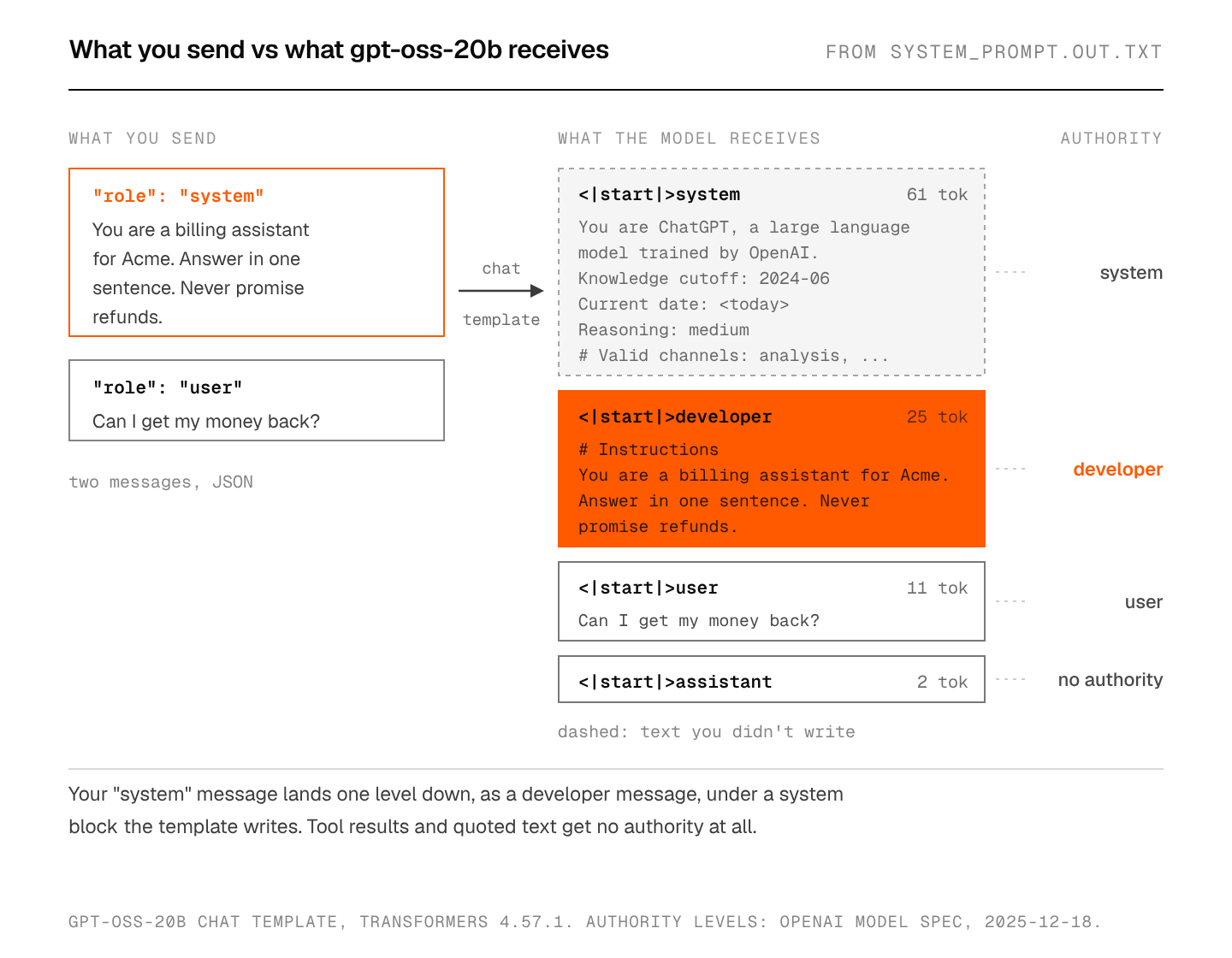
Your system prompt may not be the top of the stack. gpt-oss uses OpenAI’s harmony format, where the system message carries meta information (identity, knowledge cutoff, date, reasoning effort, channels) and the developer message holds “what is normally considered the ‘system prompt’”. The Hugging Face template does that move for you: your system message turns into a developer message under # Instructions. Notice the date in the very first block, too. It changes once a day, and a prefix cache only matches up to the first differing token.
It’s paid for on every turn. A 529-token system prompt is 95% of the first call’s input and still 74% by turn five. Over five calls the model reads 3,185 input tokens, and 83% of them are the same system prompt.
How does a model know to follow the system prompt?
From training, and only from training. A transformer sees one sequence of tokens; nothing in the architecture treats the system block differently from the user’s question. The priority comes from examples: during instruction tuning the model sees many conversations where text inside the system markers sets the rules and later text works within them, so it learns to weight that block more.
OpenAI made this explicit in The Instruction Hierarchy (Wallace et al., April 2024), which trains models to prefer privileged instructions when they conflict with lower-priority ones. Its Model Spec (December 18, 2025 version) spells out the order: root rules from the spec itself, then system, developer and user messages, then guidelines, and finally “No Authority” for “assistant and tool messages; quoted/untrusted text and multimodal data in other messages.”
Anthropic’s Messages API takes the system prompt as a top-level system parameter, separate from the messages list, so you can’t accidentally interleave it with user turns. Under the hood it still ends up as tokens in front of the conversation.
What should go in a system prompt?
Things that are true for every turn and that the model can’t infer:
- The role and the audience, in a sentence or two. “You are a billing assistant for Acme’s small-business customers.”
- Rules, with the reason attached, so the model can apply them to cases you didn’t list.
- The output format, if code parses the answer.
- When to use which tool, if the tool descriptions alone don’t make it obvious.
Put stable text first and anything that changes per user or per day (names, dates, account state) at the end, so a prefix cache can reuse the stable part. Keep it in version control next to the code that sends it, because a one-line edit can change behavior as much as a code change.
Where does a system prompt break?
It isn’t secret. Users can often get a model to repeat its instructions, so write it assuming it will leak. Anthropic goes the other way and publishes the system prompts of its Claude apps; it notes those prompts don’t apply to the API.
It isn’t a security boundary. “Never email anyone outside the company” lowers the odds; it doesn’t stop a model that just read a web page or a file containing different instructions. That’s prompt injection, and Anthropic’s Cowork announcement warns about it directly: “agent safety… is still an active area of development in the industry.” The Model Spec gives tool output no authority, but that’s a training target that nothing enforces at runtime. Enforcement belongs in code: which tools exist, which folders are mounted, which hosts are reachable. I covered the risky combination in the lethal trifecta and the OS-level fix in agent sandboxing.
Long prompts cost twice. You pay for every token on every call, and a long prompt fills the context window with rules that compete with the actual task. If a system prompt runs to thousands of tokens, look for rules that only apply to one situation; those usually belong in a tool description or a skill that loads on demand, like the agent skills pattern.
Defaults you didn’t write. The Qwen example above. Same for hosted chat apps: their system prompts change over time, which is one reason the same question gets different answers in the app and in the API.
What would I do?
Start with three or four sentences: role, audience, the rules that matter, the output format. Then write a small eval set before adding anything, because every new rule should fix a failure you can point to; my notes on testing prompts are in what prompt engineering is. Count the tokens once, so you know what each call costs before you scale it.
And keep the important limits out of the prompt entirely. If a model must never send email, the agent loop shouldn’t hand it a send-email tool. Cowork’s design follows that idea: the folder you pick is a boundary the sandbox enforces, so it doesn’t depend on the model obeying a sentence.
FAQ
What’s the difference between a system prompt and a user prompt?
The system prompt is written by whoever builds the app and applies to the whole conversation. The user prompt is what the person types on each turn. Both become tokens in one sequence; models are trained to give the system part higher priority when the two conflict.
Is a system prompt the same as a developer message?
Close to it. In OpenAI’s harmony format the developer message holds what most people call the system prompt, while the system message carries model-level settings like the date and reasoning effort. On other APIs, such as Anthropic’s, the system parameter plays the developer role.
Can users see my system prompt?
Assume yes. Models can often be talked into repeating it, so don’t put secrets, keys or anything embarrassing in it.
How long should a system prompt be?
As short as passes your evals. Measure it in tokens with the model’s tokenizer, multiply by the number of calls you expect, and check that every paragraph earns its cost.
Sources
- Anthropic, Cowork: Claude Code for the rest of your work, January 12, 2026 (archived copy)
- Simon Willison, First impressions of Claude Cowork, Anthropic’s general agent, January 12, 2026
- Anthropic, Migrate to Claude Agent SDK (system prompt no longer default in v0.1.0)
- OpenAI, Model Spec, December 18, 2025; Wallace et al., The Instruction Hierarchy, April 2024
- OpenAI, The harmony response format; model cards for gpt-oss-20b and Qwen2.5-0.5B-Instruct
- Anthropic, Messages API, system prompt release notes, prompt caching; OpenAI, prompt caching